Stacer Free Download

Overview
Stacer Free Download – Open-Source Linux System Optimizer and Monitor
Stacer is a free, open-source system optimizer and application monitor for Linux that helps you manage your entire system from a single, user-friendly interface. It combines system resource monitoring, startup management, service control, package uninstallation, and cache cleaning in one application. This article provides a comprehensive guide to downloading, installing, and using Stacer.
What is Stacer?
Stacer is an open-source system optimizer and monitoring tool developed by Oguzhan Inan. It is available for Linux distributions including Ubuntu, Fedora, and Arch Linux, and is distributed under the MIT license. The latest release is 1.7.0, and the application is approximately 7MB in size.
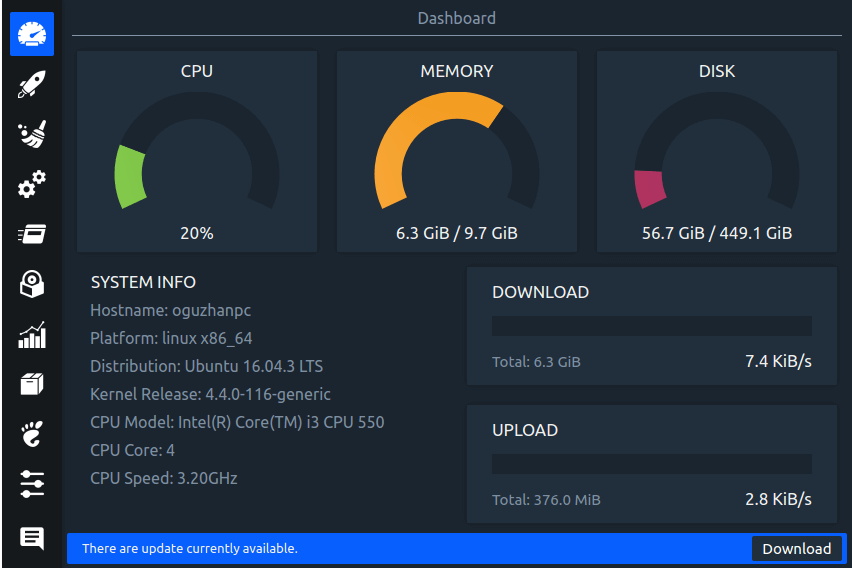
Stacer is often described as the Linux equivalent of CCleaner. It provides a graphical interface for system administration tasks that would otherwise require command-line tools, making Linux system maintenance accessible to users of all skill levels. The application includes a real-time dashboard, resource monitoring charts, and a comprehensive set of utilities for keeping your system running smoothly.
Key Features of Stacer
System Dashboard
Real-time graphs showing CPU, memory, and disk usage. See at a glance what your system is doing and identify resource bottlenecks.
System Cleaner
Clear application caches, crash reports, system logs, and leftover configuration files. Reclaim disk space without manually hunting through directories.
Startup Apps Manager
Control which applications launch when your system starts. Disable unnecessary startup items to improve boot times and reduce resource consumption.
Services Manager
Start, stop, enable, and disable systemd services from a graphical interface. Monitor service status without using the terminal.
Package Uninstaller
Uninstall applications and their dependencies through a graphical interface. Stacer handles the package management operations behind the scenes.
Process Manager
View and manage running processes with sorting by CPU or memory usage. Terminate unresponsive applications directly from Stacer.
Resource Monitoring
Track CPU, memory, disk, and network usage over time. Identify patterns and troubleshoot performance issues.
How to Download Stacer
Stacer can be downloaded from the official GitHub repository or installed via package managers.
| Platform | Download Link |
|---|---|
| Ubuntu/Debian (.deb) | Download .deb Package |
| Fedora (.rpm) | Download .rpm Package |
| AppImage | Download AppImage |
| Source Code | Download from GitHub |
Installation Guide
Ubuntu/Debian Installation
- Download the .deb package from the GitHub releases page
- Install with:
sudo apt install ./stacer_*.deb - Launch Stacer from the application menu or run
stacerin the terminal
Fedora Installation
- Download the .rpm package from the GitHub releases page
- Install with:
sudo dnf install ./stacer-*.rpm - Launch Stacer from the application menu
AppImage Usage
- Download the AppImage from the GitHub releases page
- Make it executable:
chmod +x Stacer-*.AppImage - Run the AppImage to launch Stacer
Why Choose Stacer?
Stacer is the best free Linux system optimizer and monitor for users who want a graphical, all-in-one system management tool. It combines the functionality of multiple command-line utilities into a single, intuitive interface. Stacer is particularly useful for Linux users who are transitioning from Windows and prefer a graphical approach to system maintenance.
For Linux users who need to document system configurations or performance reports, the PDF Converter can help convert reports to PDF. The JSON Formatter is useful for formatting configuration files.
System Requirements
- Operating System: Ubuntu, Debian, Fedora, Arch Linux, and other major distributions
- Processor: Any modern processor
- Memory: 256MB RAM minimum
- Disk Space: 7MB for installation
- Dependencies: Qt framework (usually pre-installed on desktop Linux)
Alternatives to Stacer
Other Linux system tools include BleachBit (cleaner-focused, cross-platform) and Ubuntu Cleaner (Ubuntu-specific). Stacer's comprehensive dashboard and integrated toolset make it the best all-in-one choice for Linux system management.
Conclusion
Stacer is the best free Linux system optimizer and monitor, offering a comprehensive set of system management tools in a clean graphical interface. Download Stacer today and keep your Linux system running smoothly.
