Mp3tag Free Download

Overview
Mp3tag Free Download – Music Tag Editor and Organizer
Mp3tag is a free and powerful music tag editor that lets you edit metadata, rename files, add cover art, and organize your entire music library with ease. It supports a wide range of audio formats and can batch-edit thousands of files at once. This article provides a comprehensive guide to downloading, installing, and using Mp3tag.
What is Mp3tag?
Mp3tag is a free music tag editor developed by Florian Heidenreich. It is available for Windows 7 through Windows 11 and is one of the most widely used metadata editing tools for audio files. The current version is 3.35.1, released in August 2026, and the application is only about 3.4 MB in size.
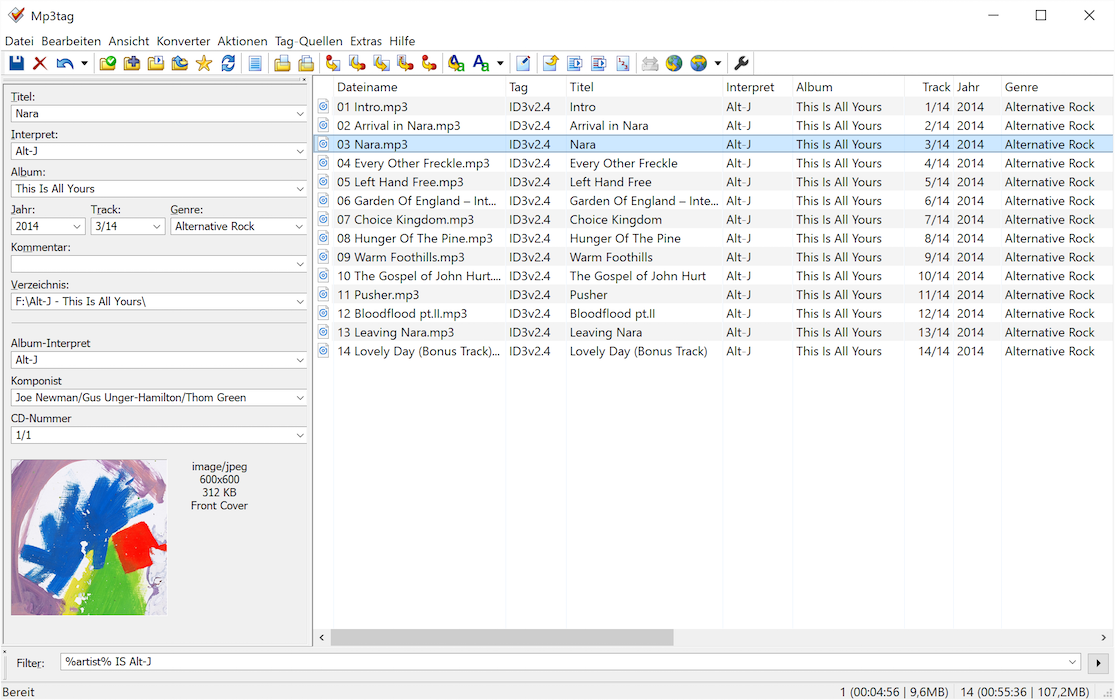
Mp3tag allows you to edit metadata tags for multiple files simultaneously, rename files based on tag information, import tags from online databases, and create playlists. It supports ID3v1.1, ID3v2.3, ID3v2.4, iTunes MP4, WMA, Vorbis Comments, and APE tags.
Key Features of Mp3tag
Batch Tag Editing
Edit tags for multiple files at once. Mp3tag supports writing and modifying ID3v1.1, ID3v2.3, ID3v2.4, iTunes MP4, WMA, APEv2 tags, and Vorbis Comments across thousands of files simultaneously.
Wide Format Support
Supports Advanced Audio Coding (AAC), Free Lossless Audio Codec (FLAC), Monkey's Audio (APE), MP3, MP4/M4A, Musepack (MPC), Ogg Vorbis, OptimFROG, Speex, True Audio, Windows Media Audio (WMA), WavPack, and more.
File Renaming
Automatically rename files based on tag information or import tags from filenames. Replace characters or words from tags and filenames with precision.
Online Database Import
Import tag information from online databases like Discogs and MusicBrainz with automatic matching. Fetch lyrics and cover art automatically.
Cover Art Management
Add, replace, and remove album covers. Mp3tag handles multiple covers per file and supports embedding artwork directly into audio files.
How to Download Mp3tag
Mp3tag can be downloaded from the official website at mp3tag.de or from TechSpot.
| Platform | Download Link |
|---|---|
| Windows (Official) | Download from Official Site |
| Windows (TechSpot) | Download from TechSpot |
Installation Guide
Windows Installation
- Download the installer from mp3tag.de or TechSpot
- Run the installer and follow the setup wizard
- Choose the installation directory (default is recommended)
- Complete the installation and launch Mp3tag
- Point Mp3tag to your music folder to begin editing tags
Why Choose Mp3tag?
Mp3tag is the best free music tag editor available for Windows. It supports virtually every audio format, can batch-edit thousands of files at once, and includes powerful features like online database import and cover art management. Mp3tag is lightweight, fast, and actively maintained with regular updates.
For musicians and producers who need to create album artwork or promotional graphics, the Color Palette Generator can help design cohesive visuals. The Image Compression tool is useful for optimizing cover art file sizes.
System Requirements
- Operating System: Windows 7/8/10/11
- Processor: Any modern processor
- Memory: 128MB RAM minimum
- Disk Space: 3.4 MB for installation
Alternatives to Mp3tag
Other tag editors include Kid3 (open-source, cross-platform) and MusicBrainz Picard (open-source, fingerprinting-based). Mp3tag's batch editing capabilities, online database integration, and Windows-native performance make it the best choice for most users.
Conclusion
Mp3tag is the best free music tag editor, offering batch editing, format support, and online database integration. Download Mp3tag today and organize your music library.
