Bulk Crap Uninstaller Free Download

Overview
Bulk Crap Uninstaller Free Download – Bulk Program Remover for Windows
Bulk Crap Uninstaller (BCUninstaller) is a free and open-source program uninstaller for Windows that excels at removing large amounts of applications with minimal user input. It can clean up leftovers, detect orphaned applications, run uninstallers according to premade lists, and much more. This article provides a comprehensive guide to downloading, installing, and using Bulk Crap Uninstaller.
What is Bulk Crap Uninstaller?
Bulk Crap Uninstaller is a free (as in speech) program uninstaller developed by Marcin Szeniak (Klocman). It is available for Windows 10 and newer (v6 requires .NET 8), with v5 supporting Windows 7 SP1. The latest version is 6.3, and the application is licensed under the Apache 2.0 open-source license, meaning it can be used in both private and commercial settings for free and with no obligations.
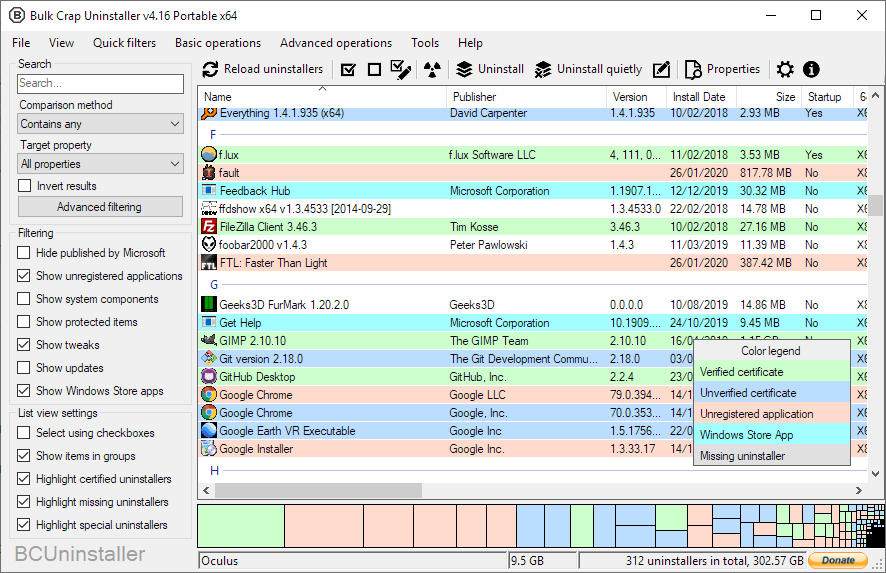
BCU was made with IT professionals in mind, but it can be used by anyone with a basic understanding of how applications are installed and uninstalled in Windows. It is fully compatible with Windows Store Apps, Steam, and Windows Features, and has special support for many uninstalling systems including NSIS, InnoSetup, and Msiexec.
Key Features of Bulk Crap Uninstaller
Bulk Uninstallation
Remove large amounts of applications quickly with minimal user input. Select multiple programs and uninstall them all at once.
Leftover Cleanup
Clean up leftover files, folders, and registry entries that standard uninstallers leave behind. BCU scans for and removes orphaned data.
Orphaned Application Detection
Detect applications that are no longer properly installed but still have entries in the Windows registry.
Premade Uninstall Lists
Run uninstallers according to premade lists, making it easy to clean up a system to a specific configuration.
Portable Version
A self-contained portable version includes the required .NET runtime, making it ideal for systems where you can't or don't want to install .NET separately. All settings are stored in a single file, perfect for USB drives.
Wide Compatibility
Fully compatible with Windows Store Apps, Steam, Windows Features, NSIS, InnoSetup, Msiexec, and many other uninstalling systems.
How to Download Bulk Crap Uninstaller
BCUninstaller can be downloaded from the official GitHub repository or from trusted software download platforms.
| Platform | Download Link |
|---|---|
| GitHub Releases | Download from GitHub |
| Official Homepage | Visit bcuninstaller.com |
| SourceForge | Download from SourceForge |
| FossHub | Download from FossHub |
Installation Guide
Windows Installation (Setup Version)
- Download the setup installer from GitHub releases or the official homepage
- Run the installer and follow the setup wizard
- If your system is missing the required .NET runtime, it is automatically installed
- Complete the installation and launch BCUninstaller
Portable Version (No Installation Required)
- Download the portable ZIP from GitHub releases
- Extract the ZIP to your preferred location (e.g., a USB drive)
- Run BCUninstaller.exe directly — no installation required
- All settings are stored in the application folder
Why Choose Bulk Crap Uninstaller?
Bulk Crap Uninstaller is the best free bulk program remover for Windows. It excels at removing large amounts of applications with minimal user input, cleans up leftovers that standard uninstallers miss, and detects orphaned applications that are no longer properly installed. BCU is fully open-source under the Apache 2.0 license, meaning it can be used for free in both private and commercial settings.
For users who need to document their system state before and after bulk uninstallation, the PDF Converter can help convert system reports to PDF. The JSON Formatter is useful for organizing configuration data.
System Requirements
- Operating System: Windows 10 or newer (v6), Windows 7 SP1 (v5)
- Processor: Any modern 64-bit processor
- Memory: 256MB RAM minimum
- Disk Space: 9.1 MB for installation (portable version larger due to bundled runtime)
- .NET: .NET 8 desktop runtime (not needed for portable version)
Alternatives to Bulk Crap Uninstaller
Other uninstall tools include Revo Uninstaller (freemium, comprehensive) and Geek Uninstaller (ultra-lightweight, portable). Bulk Crap Uninstaller's focus on bulk removal, orphaned application detection, and open-source licensing make it the best choice for IT professionals and users who need to clean up multiple systems.
Conclusion
Bulk Crap Uninstaller is the best free bulk program remover for Windows, offering orphaned application detection and leftover cleanup in an open-source package. Download Bulk Crap Uninstaller today and take control of your installed programs.
