Snipaste Free Download

Overview
Snipaste Free Download – Screenshot and Paste Tool
Snipaste is a free, lightweight screenshot tool for Windows and macOS that lets you capture your screen and paste the screenshot back as a floating window on your screen. It is a simple but powerful tool that has become popular among developers and designers. This article provides a comprehensive guide to downloading, installing, and using Snipaste.
What is Snipaste?
Snipaste is a free screenshot tool developed by Levie. It is available for Windows and macOS, and is distributed as freeware for personal and commercial use. The current version is 2.10.6, released in 2026.
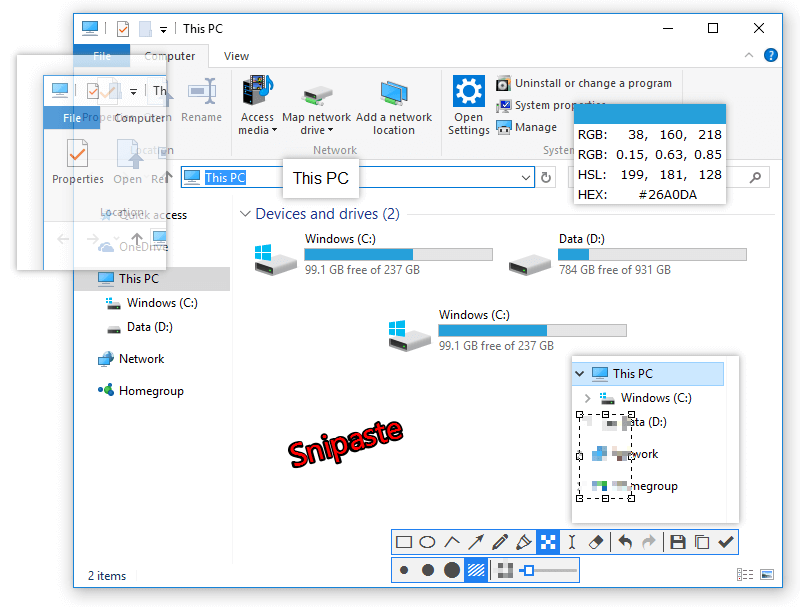
Snipaste's core concept is simple but powerful: take a screenshot, then paste it back onto your screen as a floating window. This is useful for referencing information while working, comparing images, or keeping important information visible. Snipaste also supports annotation, color picking, and history.
Key Features of Snipaste
Screenshot and Paste
Take a screenshot and paste it back onto your screen as a floating, always-on-top window. The window can be moved, resized, and even made semi-transparent.
Annotation Tools
Annotate screenshots with rectangles, ellipses, arrows, text, and freehand drawing. Full support for color and thickness customization.
Color Picker
Pick colors from anywhere on your screen. Copy the color code to your clipboard for use in design work.
History and Management
Access recent screenshots from history. Restore previous screenshots for re-editing or re-pasting.
Lightweight
Snipaste is lightweight and fast, with minimal resource usage. It runs quietly in the system tray.
How to Download Snipaste
Snipaste can be downloaded from the official website at snipaste.com.
| Platform | Download Link |
|---|---|
| Windows | Download Windows Installer |
| Windows (Portable) | Download Portable Version |
| macOS | Download macOS Package |
Installation Guide
Windows Installation
- Download the installer from snipaste.com
- Run the installer and follow the setup wizard
- Choose the installation directory (default is recommended)
- Complete the installation and launch Snipaste
- Snipaste will run in the system tray and respond to keyboard shortcuts
Portable Version
- Download the portable ZIP from snipaste.com
- Extract the ZIP to your preferred location
- Run Snipaste.exe directly — no installation required
Why Choose Snipaste?
Snipaste is the best free screenshot tool for users who need to reference information while working. Its unique paste-as-floating-window feature makes it invaluable for developers, designers, and anyone who works with multiple windows. Snipaste is lightweight, free, and available on Windows and macOS.
For users who need to compress screenshots before sharing, the Image Compression tool can help reduce file sizes. The Color Palette Generator is useful for creating annotation color schemes.
System Requirements
- Operating System: Windows 7/8/10/11, macOS 10.13+
- Processor: Any modern processor
- Memory: 256MB RAM minimum
- Disk Space: 30MB for installation
Alternatives to Snipaste
Other screenshot tools include ShareX (feature-rich, Windows) and Flameshot (cross-platform, open-source). Snipaste's paste-as-floating-window feature and color picker make it unique and valuable for users who need to reference screenshots while working.
Conclusion
Snipaste is the best free screenshot and paste tool, offering a unique floating window feature that's perfect for referencing information. Download Snipaste today and streamline your screenshot workflow.
