CodeLite Free Download – Lightweight Cross-Platform IDE

Overview
CodeLite Free Download – Lightweight Cross-Platform IDE
CodeLite is a free, open-source cross-platform IDE specialized in C, C++, Rust, Python, PHP, and JavaScript (mainly for backend developers using Node.js). It runs on all major platforms including Windows, macOS, and Linux. This article provides a comprehensive guide to downloading, installing, and using CodeLite.
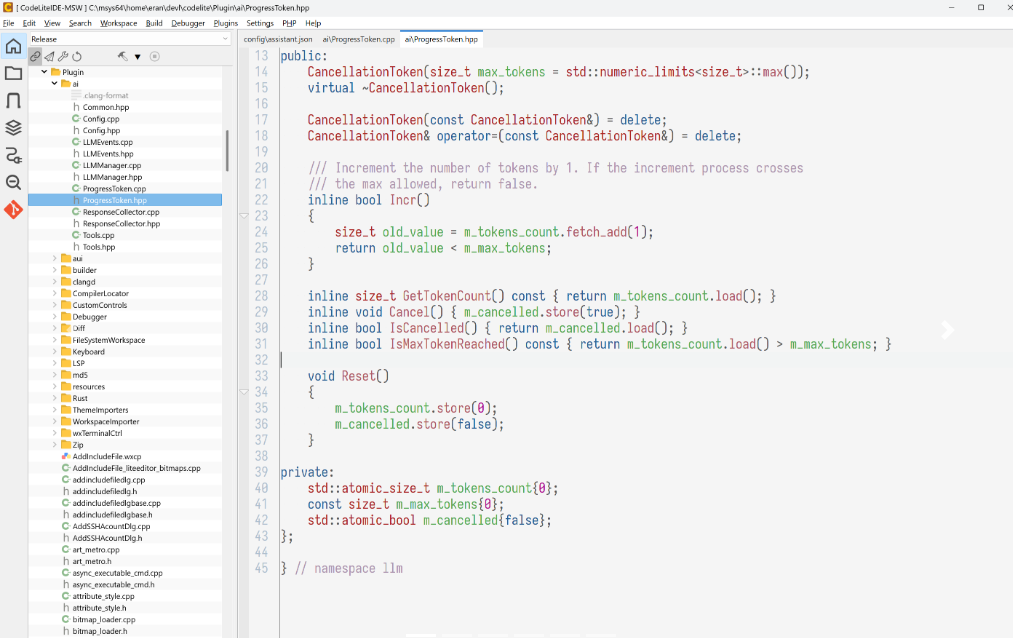
What is CodeLite?
CodeLite is a lightweight and efficient IDE designed for developers who need a powerful yet lightweight development environment. It is distributed under the terms of the GPLv2 license with an exception for plugins. The latest version is 18.4.0 as of June 2026.
Key Features of CodeLite
Multi-Language Support
CodeLite supports C, C++, Rust, Python, PHP, and JavaScript (Node.js). This makes it a versatile choice for developers working with multiple programming languages.
Clang/GCC Support
Full integration with Clang and GCC compilers provides accurate code completion, syntax highlighting, and error detection.
Debugger Integration
Built-in debugger support with breakpoints, watch variables, and step-through execution. Debug C/C++ and other languages seamlessly.
Project Management
Create and manage projects with support for multiple build configurations, custom build commands, and workspace organization.
Plugin Architecture
Extend CodeLite's functionality with plugins. Plugins developed for CodeLite can remain closed source and be distributed under any license.
Cross-Platform
CodeLite runs on Windows 10/11, macOS, Linux, and FreeBSD.
How to Download CodeLite
CodeLite can be downloaded from the official website. The download page provides installers and packages for all supported platforms.
| Platform | Download Link |
|---|---|
| Windows 10/11 (64-bit) | Download Windows Installer |
| Ubuntu/Debian | Configure Repository |
| Fedora/OpenSUSE | Download RPM |
| macOS | Install via Homebrew |
| FreeBSD | Download from FreshPorts |
Installation Guide
Windows Installation
- Download the Windows installer (64-bit) from the official website
- Run the installer and follow the setup wizard
- Choose the installation directory and components
- Complete the installation and launch CodeLite
macOS Installation
- Install via Homebrew:
brew install codelite - Or download and install the package from the official website
- Launch CodeLite from Applications
Ubuntu/Debian Installation
- Configure the CodeLite repository following the official documentation
- Update package list:
sudo apt-get update - Install CodeLite:
sudo apt-get install codelite
Why Choose CodeLite?
CodeLite stands out as a lightweight, efficient IDE that doesn't sacrifice features. It is free, open-source, and runs on all major platforms. The latest version 18.0.0 (as of October 2025) continues to improve the development experience. CodeLite is particularly well-suited for C, C++, PHP, and JavaScript development.
For developers who work with JSON configuration files, the JSON Formatter can help validate and format JSON data. The Color Palette Generator is useful for designing UI color schemes.
System Requirements
- Operating System: Windows 10/11, macOS, Linux, FreeBSD
- Processor: 1GHz or faster
- Memory: 2GB RAM minimum, 4GB recommended
- Disk Space: 200MB for installation
Alternatives to CodeLite
Other free IDEs include Visual Studio Code (free code editor, hundreds of languages supported), Dev C++ (lightweight Windows C/C++ IDE), and Wing 101 (simplified Python IDE for beginners). However, CodeLite's cross-platform nature and specialized support for C/C++ and PHP make it a strong choice for developers in these ecosystems.
Conclusion
CodeLite is a powerful, free, and open-source IDE that provides an excellent development experience across all major platforms. With support for multiple programming languages and a lightweight footprint, it's an ideal choice for developers who value efficiency. Download CodeLite today and start coding.
